
Streaming Concept in MuleSoft
Overview:
1.1 . Introduction:
- In MuleSoft, streaming refers to processing large data in chunks rather than loading the entire content into memory. It enables efficient handling of large files, database records, or API responses without exhausting system resources. Streaming ensures Mule applications can scale and perform efficiently even when dealing with gigabytes of data.
1.2 . Learning Objectives:
- Understand what streaming is and why it’s needed.
- Differentiate between repeatable and non-repeatable streams.
- Identify when to enable streaming in Mule flows.
- Implement a simple streaming flow using Mule components.
- Apply best practices to prevent performance and memory issues.
1.3 . What is Streaming:
- Streaming is the process of reading and processing data in smaller, manageable chunks instead of loading it entirely into memory.
- Without Streaming:
– The entire data payload (e.g., file or database result) is loaded into memory.
– Suitable only for small data sizes.
– May lead to OutOfMemoryError for large payloads. - With Streaming:
– Data is read and processed progressively.
– Lower memory consumption.
– Ideal for large-scale integration and ETL use cases.
1.4 . How Streaming Works in MuleSoft:
- In streaming, a pointer (or cursor) is used to locate and retrieve data from the source.
- This cursor is enclosed within a stream object, which can be layered with other streams to create a chain of data flows.
- Instead of loading the complete dataset at once, streaming processes data in smaller chunks dynamically, enabling continuous data flow, reducing memory usage, and enhancing overall performance.
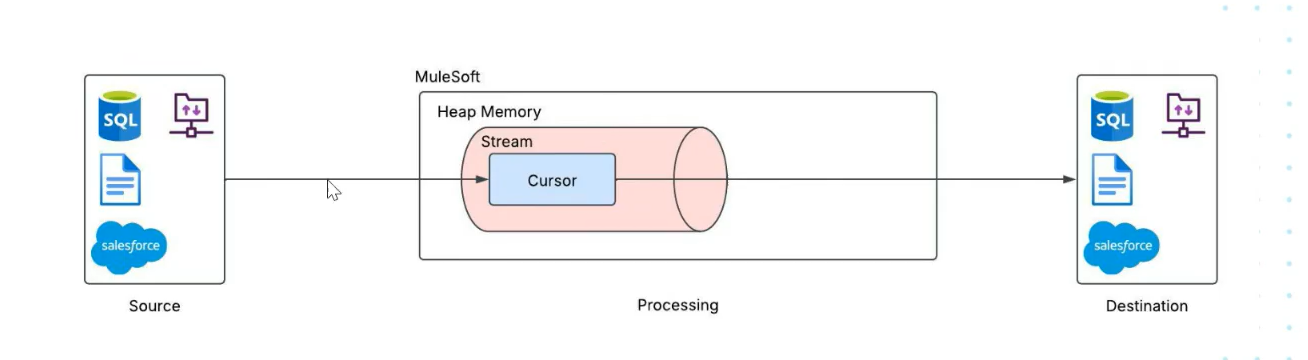
Streaming Classification and Types:
2.1 . Stream vs Iterable:
- We will notice that while enabling the repeatable in-memory streaming for various connectors we will see two different entities:
- Repeatable in-memory stream
- Repeatable in-memory iterable
- They correlate to the concept of binary streaming and object streaming
2.1.A . Repeatable in-memory stream (Binary Streaming) :
- In this we don’t have idea about the data structure so we can’t divide into chunks but we can divide on the basis of size
- They are configurable for the HTTP, File, SFTP and sockets module.
- Configuration Parameters in following image:
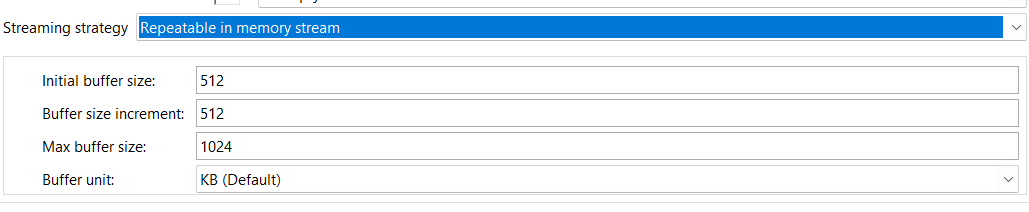

- Initial buffer size: 512
- Defines the starting size of the memory buffer (in kilobytes by default) used to store the stream.
- Buffer size increment: 512
- Specifies how much memory (in KB) will be added each time the buffer needs to expand to accommodate more data.
- Max buffer size: 1024
- Sets the maximum memory allocation limit for the stream buffer. If the data exceeds this size, the stream may fail or need a different strategy (like file-based streaming).
- Buffer unit: KB (Default)
- Indicates the measurement unit for all buffer-related fields (can also be changed to bytes, MB, etc).
2.1.B . Repeatable in-memory iterable (Object Streaming) :
- Object streams are effectively object iterables. They can be divided into chunks like for database select operation it is records and for salesforce query operation it is objects.
- Configuration Parameters in following image:


3.1 . Types of Streaming:
There are three types of Streams in Mule 4:
- Non-Repeatable Stream (available in Mule 3 also)
- Repeatable In-Memory Stream
- Repeatable File Stored Stream (default streaming strategy in Mule 4)
3.1.A . Non-Repeatable Stream:
- This is a fundamental concept in MuleSoft and a very common “gotcha” for new developers.
- A non-repeatable stream is a stream of data that can only be read once.
- Think of it like drinking water from a glass. Once you drink the water, it’s gone. You can’t drink the exact same water again.
- Why MuleSoft Uses Non-Repeatable Streams
- MuleSoft uses this approach for high performance and low memory usage.
- Imagine you receive a 2GB file. Instead of loading that entire 2GB file into memory (which would likely crash your application), MuleSoft “streams” it. This means it holds a pointer to the data and only reads small chunks as needed.
- Configurate following below:
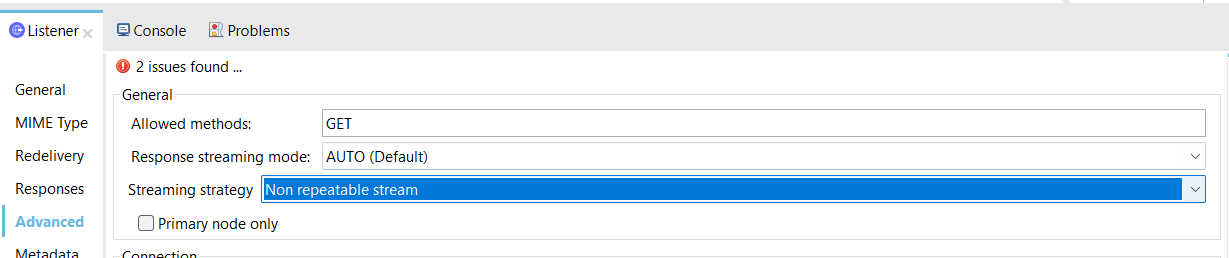
- Different Scenario:
- we can see that the source data is available until next component only.
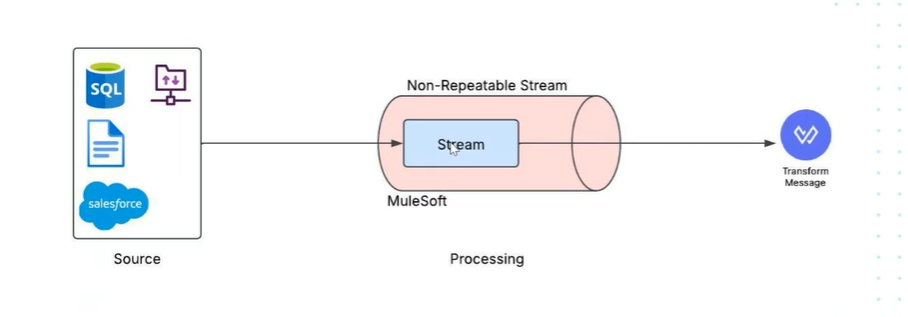 we can’t access stream to second component in a mule flow.
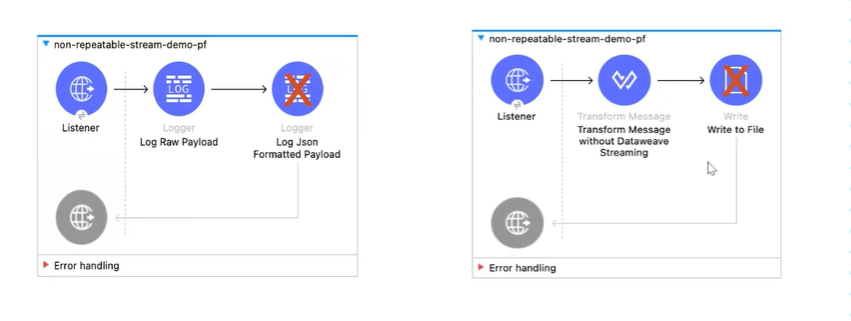
-
- We can’t access source data simultaneously in flow like using scatter gather
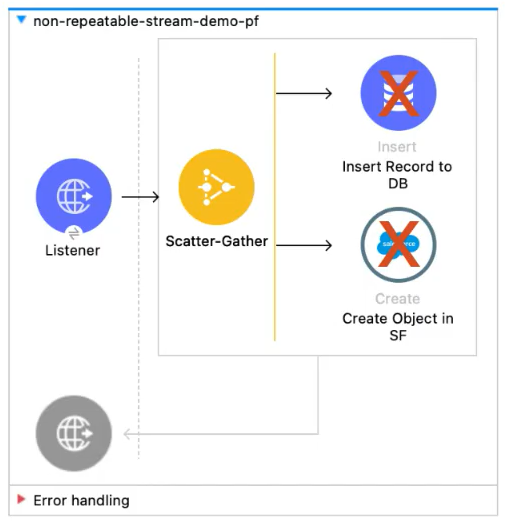
3.1.B . Repeatable In- Memory Stream or Repeatable In- Memory Iterable:
- A repeatable stream is a stream that can be read multiple times.
- It’s the solution to the “stream closed” error you get with non-repeatable streams.
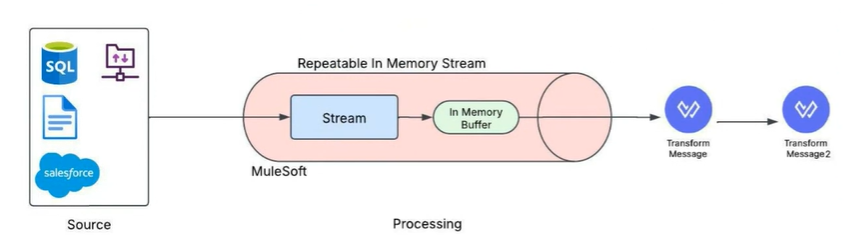
- How It Works: The “Water Bottle” Analogy
- If a non-repeatable stream is like drinking directly from a running tap (you only get the water as it flows by once), a repeatable stream is like filling up a water bottle from that tap.
- First Read (Buffering): The very first time you try to read the stream (e.g., in a Logger), MuleSoft reads the entire stream from the source and stores it in a temporary buffer (in memory).
- Subsequent Reads: Now that the data is buffered, any other component (like a Transform or another Logger) can read the data. They are reading from the in-memory buffer, not the original, one-time-use stream.
- Reset: The stream’s pointer (or cursor) can be “reset” to the beginning of the buffer, allowing it to be read over and over.
- If a non-repeatable stream is like drinking directly from a running tap (you only get the water as it flows by once), a repeatable stream is like filling up a water bottle from that tap.
3.1.C . Repeatable File Stored Stream:
- The Repeatable File Stored Stream is the default streaming strategy in Mule 4.
- It enables Mule applications to store streamed data temporarily on disk (in a file) rather than in memory. This allows the data to be read or re-read multiple times within the same flow without consuming large amounts of RAM.

- How it works:
- When a stream is created, Mule stores the content in a temporary file on disk.
- If any component (like a logger, transformer, or connector) tries to read the stream again, Mule retrieves it from this file instead of reloading it from the original source.
- Once the flow completes, the temporary file is automatically cleaned up by Mule to free up space.
Comparison:
4.1 . Comparison of Repeatable vs Non-Repeatable Streaming in MuleSoft with Usecase:
- This use case demonstrates the performance and behavior differences between repeatable and non-repeatable streaming while processing large JSON datasets.
- Two separate flows are designed — one for non-repeatable streaming and another for repeatable streaming. Each flow reads a JSON file containing one lakh (100,000) records, writes the output, and logs the total processing time for analysis.
- The flows are triggered using a Scheduler, and variables are used to capture the start and end timestamps to calculate execution time. By comparing both executions, we can observe the impact of streaming configuration on memory usage, processing efficiency, and repeatability of the data stream during large payload handling.
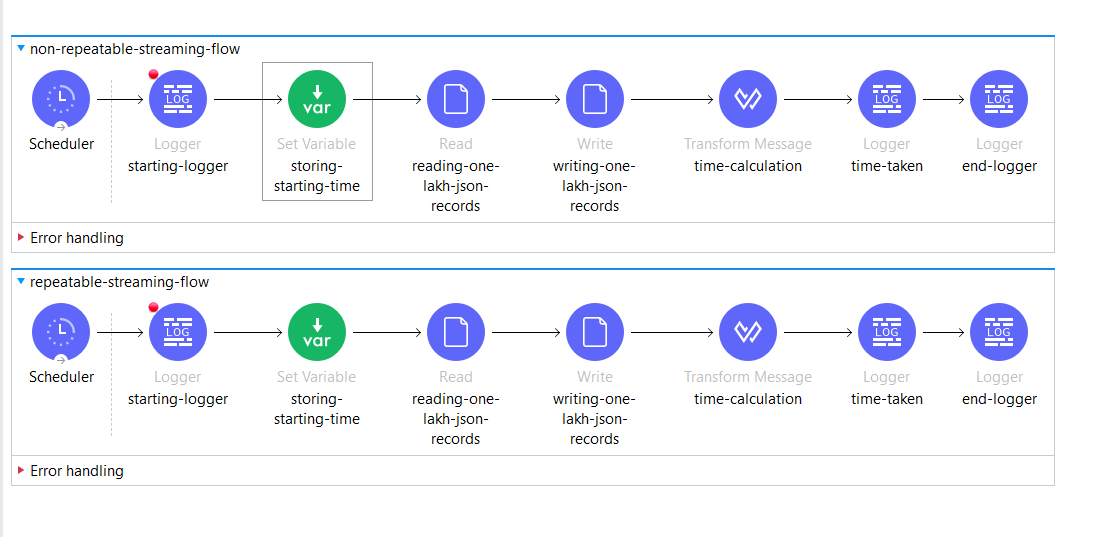
- Console Output: Execution Logs for Streaming Flows:

- Tabular comparison:

Note:
- Actual execution time may vary based on resources and payload size.
- Repeatable streams trade off a small amount of performance for reliability and data reusability.
Conclusion:
- Non-repeatable streams are faster but can only be read once.
- Repeatable streams ensure data can be accessed multiple times but introduce minimal latency due to buffering (either in-memory or file-based).
Streaming Usage Guidelines and Best Practices:
5.1 . Use Cases:
- Large File Processing
- Database ETL Jobs
- API Gateway Integration
- Cloud Storage Transfers
. When to Use and When Not to Use:
- Use Streaming When:
- Data is large.
- Memory optimization is needed.
- Payload is used once.
- Working in batch or ETL scenarios.
- Avoid Streaming When:
- Data is small.
- Random access required.
- Payload reused multiple times.
7.1 . Common Mistakes and Tips:
- Avoid logging full payloads for large data.
- Enable streaming in File or Batch components.
- Use repeatable streams if multiple reads required
8.1 . Terminology Reference:
- Payload – The main data being processed by Mule.
- Cursor Stream – Reads data sequentially in chunks.
- Repeatable Stream – Can be re-read multiple times.
- Non-Repeatable Stream – Can be read only once.
9.1 . Related Concepts:
- Batch Processing
- Pagination using Queues
Need Expert MuleSoft Integration Support?
Handling large payloads, optimizing streaming, and ensuring high-performance Mule applications requires the right architecture and expertise.
At TGH Software Solutions Pvt. Ltd., our MuleSoft experts help enterprises design scalable, memory-efficient, and high-performing integrations using best practices in streaming, API management, and enterprise connectivity.
Whether you’re working with large JSON files, ETL jobs, API integrations, or performance tuning — we can help you build it right the first time.
📞 Call Us: +91 93109 47352
🌐 Website: https://www.techygeekhub.com
📩 Request Consultation: https://www.techygeekhub.com/contact-us
Let’s build scalable, enterprise-grade MuleSoft integrations together.