The TLS Handshake: Anatomy of a Secure Connection
The Secret Handshake
1.1 . Five Surprising Truths About How HTTPS Keeps You Safe:
- Every time you visit a secure website, you see it: the little padlock icon next to the URL, the reassuring “s” in “https://”. We see this symbol countless times a day and accept it as a sign that our connection is safe. It’s an invisible shield we’ve learned to trust without a second thought.
- But have you ever wondered what’s really happening in the milliseconds before a secure page loads? Before a single piece of your data is sent, your browser and the web server engage in an intricate digital dance—a secret conversation to establish the rules of engagement and build a secure tunnel for communication. This process is called the TLS handshake.
- While the details can be complex, the principles behind it are brilliantly elegant. This article will pull back the curtain on the classic TLS 1.2 handshake to reveal five of the most ingenious steps that make secure browsing possible.
1.2 . Prerequisite:
- Since it is one way TLS, the negotiation begins with an asymmetry of information. The Client starts with nothing while Server should contain its identity credentials which are prerequisite like following below:
- Certification Authority Certificates
- Server Certificate
- Intermediate Certificate (Certificate Chain)
- Root Certificate
- Key Pair
- Private Key
- Public Key
- Certification Authority Certificates
1.3 . It’s a Negotiation, Not a Command:
- The first thing to understand is that establishing a secure connection isn’t a one-sided command; it’s a formal negotiation. The entire process begins not with sharing secrets, but with reaching a mutual agreement on the cryptographic rules.
- This negotiation starts when your browser (the client) sends a Client Hello message to the server. This message contains several key pieces of information:
- Version – The highest version of TLS the client supports
- Cipher Suites – A ranked list of its preferred encryption methods
- Session ID – Identifies a session for potential resumption
- Client Random – A 32 byte random value
- Extension – Used for additional features
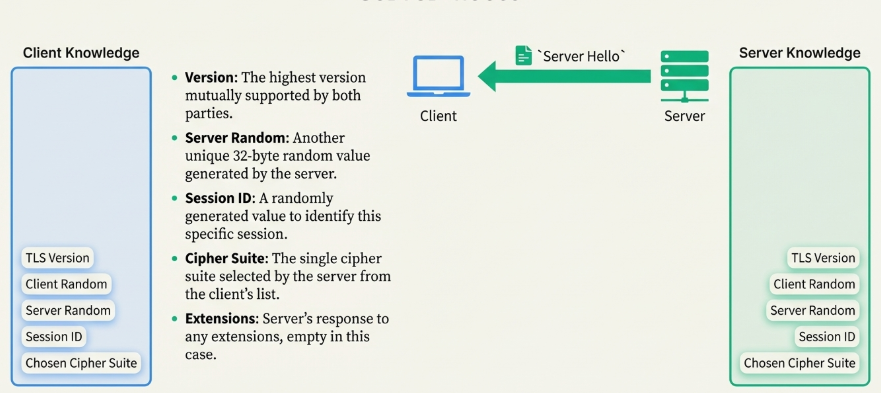
- The server then responds with a Server Hello message. It reviews the client’s list and makes two key decisions: it confirms the highest TLS version that both parties support, and it chooses a single Cipher Suite from the client’s list that it will use for the session. It also generates and sends its own 32-byte random number.
- At the end of this exchange, both sides have agreed on the rules.
1.4 . The Server Proves Its Identity with a Secret Test:
- After the “hellos” are exchanged and the rules are set, the server sends over its digital ID card: its Digital Certificate. This certificate contains identity + public key + trust proof, all digitally signed by a trusted Certificate Authority (CA) like Let’s Encrypt, Go Daddy, DigiCert, GlobalSign. At this point, your browser must answer two critical questions: Is this ID legitimate, and is the server the true owner of this ID?
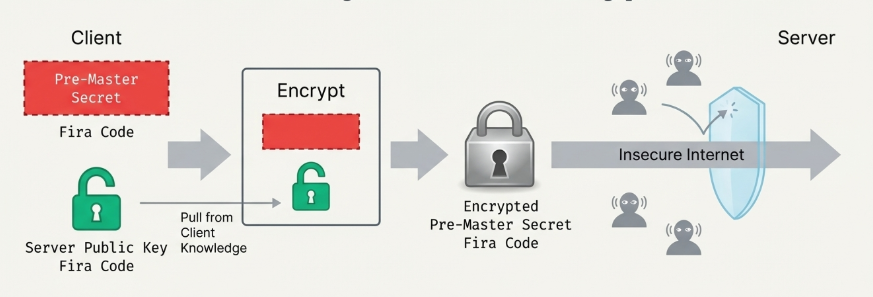
- Since the CA signed certificates are gobally trusted, client (browser) will check CA signature and generate pre-master secret after successful verification, that secret will be encrypted by server’s public key, which found in digital certificate and sent to server.
- The genius of this test is that the encrypted message can only be decrypted by the corresponding private key. By successfully decrypting the message and retrieving the original pre-master secret, the server proves, beyond a doubt, that it possesses the private key associated with the public key in the certificate. It has passed the secret test and proven it’s not an impostor.
1.5 . From Secret to Master:
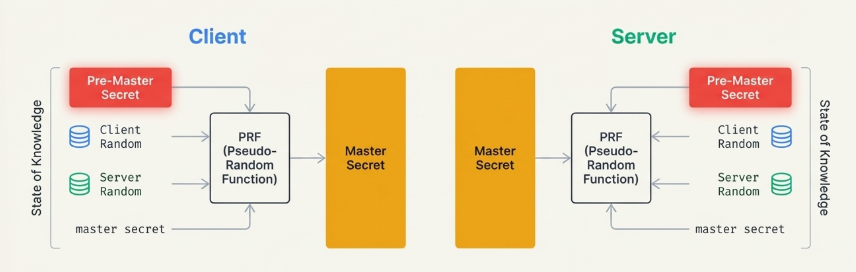
- Neither side transmits the master Secret. Instead, both parties calculate it independently using the shared values like Pre-Master Secret, Client Random, Server Random, and a default string called “master secret”.
- The Pseudo-Random Function (PRF) ensures that with identical inputs, they will generate an identical Master Secret.
1.6 . The Final Ingots: Session Keys:
- The Session Keys are calculate using Master Secret, Client Random, Server Random, and a default string called “key expansion”.
- The PRF can produce as many bits as needed for all the required secrets, ensuring both parties have a perfectly matched sets of keys for encryption and message integrity.
- Both parties will have 4 session keys:
- Client Encryption Key
- Client HMAC Key
- To protect what is send from client
- Server Encryption Key
- Server HMAC Key
- To protect what is send from server
1.7 . It’s Not One Secure Tunnel – It’s Two:
- When we think of a secure connection, we often imagine a single, protected tunnel. However, the TLS handshake is even more robust. The key generation process doesn’t create one set of keys, but a minimum of four, establishing two distinct secure channels.
- What TLS is actually doing ? – it’s creating two separate tunnels one to protect all the data sent from the client to the server and another to protect all the data sent from the server back to the client.
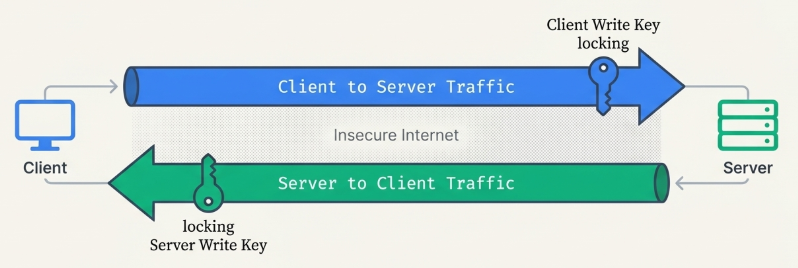
- This enhances security: even if one set of keys were compromised, it would only allow an eavesdropper or attacker to decrypt half of the conversation. Data in the other direction would remain secure
The Handshake Ends with a “Proof” Message:
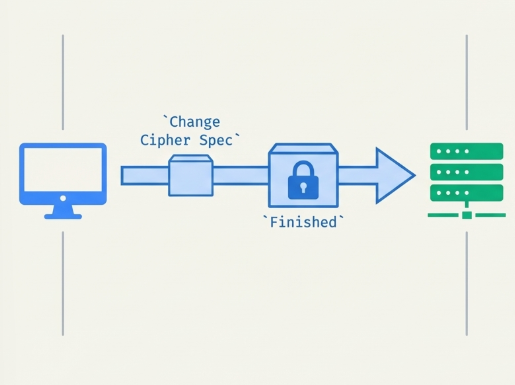
2.1 . The Client’s Proof:
- Change Cipher Spec: A signal (not a handshake record) that the Client is now switching to encrypted communication using the newly generated keys.
- Finished: The first encrypted message. It contains a hash of all previous handshake messages ( ‘Client Hello’, ‘Server Hello’, etc.). Then, it combines this hash with the master secret and the literal string “client finished” to create a block of “verification data.” Finally, it encrypts this data with its new client-to-server session keys (Client Session Keys).
- Server will decrypt and verify it with client’s session keys
- By encrypting a hash of the entire conversation so far, the client proves two things to the server:
- It has the correct session key
- It saw the exact same handshake messages, ensuring no tampering occurred.
2.2 . The Server’s Proof: A Mirror Image
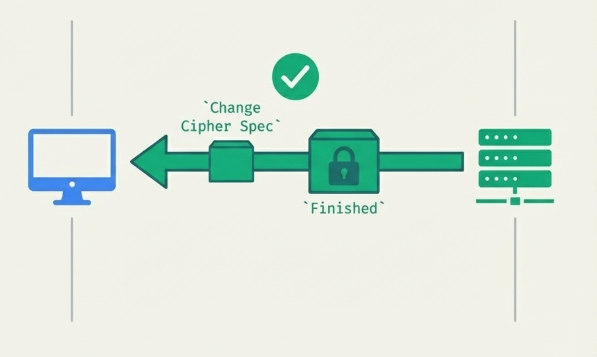
- The server performs the exact same action in reverse.
- It sends its own ‘change Cipher Spec’ and an encrypted ‘Finished’ message, there will be small change in combing handshake message. That is, it will combine with Master Secret along with literal string called “server finished”, to create a block of “verification data.” Finally, it encrypts this data with its new server-to-client session keys (Server Session Keys).
- client will decrypt and verify it with server session keys. If the contents are expected, it servers as definitive proof that the server also possesses the correct keys and saw the same, untampered handshake. Mutual trust is now established.
2.3 . The Secure Tunnel is Open:
- The handshake is complete. Through a complex but elegant negotiation, a shared was created, session keys were forged, and the connection was verified. Secure application data can now be transferred, protected from eavesdroppers.
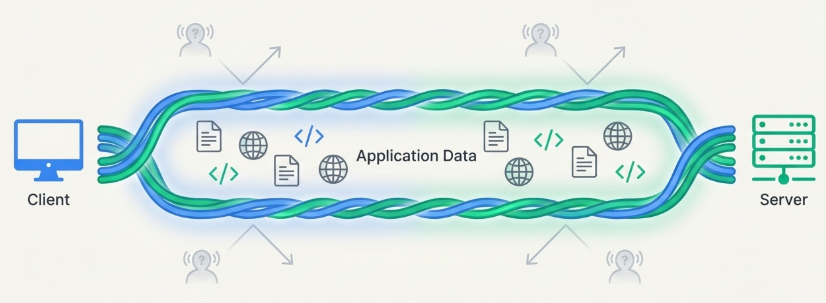
- The next time you click a link and see that padlock appear, you’ll know it’s not just an icon, it’s the successful conclusion of a brilliant digital negotiation. What other invisible systems are working to protect us every day.
🚀 Secure Your Applications with Enterprise-Grade Integration & Security
Understanding TLS is just the beginning. Implementing secure APIs, encrypted integrations, and enterprise-grade connectivity requires the right expertise.
At TGH Software Solutions Pvt. Ltd., we help organizations design secure API architectures, MuleSoft integrations, and enterprise systems built on best security practices including TLS, HTTPS, and advanced encryption standards.
Whether you need secure API integrations, MuleSoft consulting, performance optimization, or digital transformation strategy — our experts are ready to assist.
📞 Call Us: +91 93109 47352
🌐 Website: https://www.techygeekhub.com
📩 Email: info@techygeekhub.com
🔗 Contact Us: https://www.techygeekhub.com/contact-us
Let’s build secure, scalable, and future-ready digital systems together.