
EDI TRANSACTION 820
Introduction to EDI
What is EDI?
EDI stands for Electronic Data Interchange. It’s a standardized way for businesses to exchange documents and data electronically instead of using paper. This helps companies communicate more quickly, accurately, and efficiently with their trading partners (like suppliers, customers, or logistics providers).
Instead of sending paper invoices, purchase orders, shipping notices, etc., businesses use EDI messages formatted according to industry standards (like ANSI X12 or EDIFACT).
Common EDI Standards
| Standard | Description | Regions/Industries |
|---|---|---|
| ANSI X12 | The American National Standards Institute X12 is the most common EDI standard in North America. It covers a wide range of industries and transaction sets (e.g., 850 for purchase orders, 810 for invoices). | Mainly North America (US, Canada) |
| EDIFACT | Electronic Data Interchange for Administration, Commerce, and Transport, developed by the United Nations. It is widely used internationally and supports multi-industry transactions. | Worldwide, especially Europe and Asia |
| TRADACOMS | An older EDI standard mainly used in the UK retail sector. | UK retail sector |
| HL7 | Health Level Seven is a standard for exchanging health information electronically. | Healthcare industry globally |
| ODETTE | Developed by European automotive industry for supply chain communications. | Automotive industry in Europe |
Common Types of EDI Transaction Sets
| Transaction Set | Name | Purpose/Use Case |
|---|---|---|
| 810 | Invoice | Used to send billing/invoice information |
| 820 | Payment Order/Remittance Advice | Payment instructions and remittance details |
| 824 | Application Advice | Acknowledgement of received EDI transactions |
| 850 | Purchase Order | Customer’s purchase request to supplier |
| 855 | Purchase Order Acknowledgment | Supplier’s confirmation or rejection of PO |
| 856 | Advance Ship Notice (ASN) | Shipping details before goods arrive |
| 857 | Shipment and Billing Notice | Details on shipment and billing |
| 940 | Warehouse Shipping Order | Warehouse shipment instructions |
| 945 | Warehouse Shipping Advice | Confirmation of shipment from warehouse |
| 997 | Functional Acknowledgement | Simple “got it” acknowledgment for any EDI document |
| 846 | Inventory Inquiry/Advice | Updates on inventory status |
| 830 | Planning Schedule with Release Capability | Forecasts and production schedules |
| 860 | Purchase Order Change Request | Changes or modifications to an existing PO |
| 865 | Purchase Order Change Acknowledgment | Acceptance or rejection of PO changes |
What are the different Communication methods available in EDI?
AS2
DISK
FTP
HTTP
MLLP
OFTP2
SFTP
Trading Partner – Trading Partners are any organizations exchanging EDI Documents or data.
My Company – The company/ Client for which we are configuring Trading
Inbound – Control comes towards the system . To ERP from Partners/Vendors
Outbound – Controls moves away from the system . From ERP to Partners/Vendors
Prerequisites for EDI
There are certain prerequisites we need to know before starting with the EDI transaction Process.
We need to know the Version of EDI we need to process
We need to know the Transaction Type of EDI
We need to know the Communication Method of EDI
We need to know Trading Partner and My Company details
ISA01 – Authorization Information Qualifier
ISA02 – Authorization Information ID
ISA03 – Security Information Qualifier
ISA04 – Security Information ID
ISA05/07 – Interchange ID Qualifier
ISA06/08 – Interchange ID
ISA11 – Interchange Standard
ISA12 – Interchange Version
ISA14 – Interchange ACK. Requested
ISA15 – Test Indicator
ISA16 – Component Seperator
GS02/03 – Application Code
GS07 – Responsible Agency Code
GS08 – GS Version
DETAILS ABOUT SEGMENTS IN 820
What is an EDI 820?
The EDI 820 is a specific transaction set in the ANSI X12 EDI standard. It’s called the Payment Order/Remittance Advice.
Purpose: It’s used by a buyer (payer) to instruct a financial institution to make a payment to a supplier (payee).
It also contains remittance information—details explaining what the payment covers (like invoices or services being paid).
Typical Use Cases for EDI 820
Sending payment instructions to a bank or payment processor.
Providing suppliers with information on which invoices or accounts the payment relates to.
Automating the payment reconciliation process.
What’s in an EDI 820?
Some common data elements included are:
Payment amount and date
Remittance details (invoice numbers, amounts)
Payer and payee information (like company names and bank accounts)
Payment method (check, electronic funds transfer, etc.)
Basic Structure of an EDI 820 (Payment Order/Remittance Advice)
An EDI 820 document consists of segments, and each segment contains data elements. Here are some important segments you’ll often find:
| Segment | Name | Purpose |
|---|---|---|
| ST | Transaction Set Header | Starts the transaction set |
| BPR | Beginning Segment for Payment Order/Remittance Advice | Contains payment details (amount, method, etc.) |
| N1 | Name | Identifies payer and payee (companies involved) |
| ENT | Entity | Starts an entity section for each payment item |
| RMR | Remittance Advice | Provides invoice or account info related to payment |
| ADX | Adjustment | Provides adjustment information (discounts, penalties, etc.) |
| DTM | Date/Time Reference | Dates related to payment or invoice |
| SE | Transaction Set Trailer | Ends the transaction set and indicates total segments count |
Sample EDI Document
ISA*00*          *00*          *08*925485US00     *01*243305207WM    *250429*1828*:*00501*820100321*0*P*>~
GS*RA*925485US00*243305207WM*20250429*1828*820100321*X*005010~
ST*820*100326~
BPR*I*1113214.98*C*CHK************20250429*VEN~
TRN*3*760976695~
CUR*PR*USD~
N1*PR*WALMART INC.*UL*0078742000008~
N1*PE*TROPICANA PRODUCTS, INC.~
REF*IA*433855~
ENT*1~
ADX*167.45*ZZ*DB*9000127345~
REF*ST*0078742042930~
REF*6O*054~
REF*DP*00095~
REF*MR*0020~
REF*MC*888881460~
RMR*IV*9000163726*PO*33683.89*34357.69*346.9~
REF*DP*00095~
REF*MR*0020~
REF*PO*5537523813~
REF*MC*214210554~
REF*19*07~
REF*ST*0078742058528~
DTM*097*20250419~
RMR*IV*584002245*PO*-9845.23*-9845.23~
REF*DP*00095~
REF*MR*0020~
REF*PO*7411843064~
REF*MC*214758208~
REF*19*07~
REF*ST*0078742039350~
DTM*097*20250421~
SE*146*100326~
GE*1*820100321~
IEA*1*820100321~
ISA Segment (Interchange Control Header)
ISA*00* *00* *08*925485US00 *01*243305207WM *250429*1828*:*00501*820100321*0*P*>~ISA: Interchange control header, starts the whole interchange.
00* 00 *: No authorization or security info (spaces).
08*925485US00 *: Sender ID (Walmart’s ID here).
01*243305207WM *: Receiver ID (Tropicana or the payment receiver).
2504291828: Date (April 29, 2025) and time (18:28).
:*: Delimiter for composite data element separator.
00501: Version of the ANSI X12 standard (00501 is common).
820100321: Interchange control number.
0: Acknowledgement requested (0 = none).
P: Usage indicator (P = Production).
: Component element separator.
GS Segment (Functional Group Header)
GS*RA*925485US00*243305207WM*20250429*1828*820100321*X*005010~GS: Group start segment for functional group.
RA: Functional ID code for Payment Order/Remittance Advice.
925485US00: Application sender’s code.
243305207WM: Application receiver’s code.
20250429*1828: Date/time of group creation.
820100321: Group control number.
X: Responsible agency code (X = X12).
005010: Version release number.
ST Segment (Transaction Set Header)
ST*820*100326~ST: Starts the transaction set.
820: Transaction set ID (Payment Order/Remittance Advice).
100326: Transaction set control number (unique ID for this transaction).
BPR Segment (Beginning Segment for Payment Order/Remittance Advice)
BPR*I*1113214.98*C*CHK************20250429*VEN~I: Payment action code (I = Remittance Information Only; no actual payment).
1113214.98: Payment amount ($1,113,214.98).
C: Credit or debit indicator (C = Credit).
CHK: Payment method (Check).
************: Bank routing number (masked or omitted here).
20250429: Payment date (April 29, 2025).
VEN: Originator identifier (likely vendor or payer ID).
TRN Segment (Trace Number)
TRN*3*760976695~3: Trace type code.
760976695: Reference number (payment trace number).
CUR Segment (Currency)
CUR*PR*USD~PR: Currency usage code (Payment Remittance).
USD: Currency code (US Dollars).
N1 Segments (Name)
N1*PR*WALMART INC.*UL*0078742000008~
N1*PE*TROPICANA PRODUCTS, INC.~
N1*PR: Payer name — Walmart Inc., with unique ID 0078742000008.
N1*PE: Payee name — Tropicana Products, Inc.
REF Segments (Reference Identifiers)
REF*IA*433855~IA: Internal Account Number.
433855: Account number or internal ID for reference.
ENT Segment (Entity)
ENT*1~Start of payment entity (line item or invoice detail).
ADX Segment (Adjustment)
ADX*167.45*ZZ*DB*9000127345~167.45: Adjustment amount ($167.45).
ZZ: Qualifier for adjustment reason (ZZ means “Mutually Defined”).
DB: Debit adjustment.
9000127345: Reference number related to adjustment (could be invoice or account number).
Multiple REF Segments related to this ENT (Reference Identifiers for invoices, orders, etc.)
REF*ST*0078742042930~
REF*6O*054~
REF*DP*00095~
REF*MR*0020~
REF*MC*888881460~
Various reference codes:
ST: Store Number
6O: Other reference
DP: Department Number
MR: Miscellaneous reference
MC: Master Code or customer number
RMR Segment (Remittance Advice – Invoice Info)
RMR*IV*9000163726*PO*33683.89*34357.69*346.9~IV: Invoice.
9000163726: Invoice number.
PO: Purchase Order amount.
33683.89: Invoice amount.
34357.69: Amount applied.
346.9: Possibly a discount or adjustment.
More REF segments related to this invoice/payment
REF*DP*00095~
REF*MR*0020~
REF*PO*5537523813~
REF*MC*214210554~
REF*19*07~
REF*ST*0078742058528~
Various references related to the invoice, store, department, PO, etc.
DTM Segment (Date/Time)
DTM*097*20250419~097: Payment or invoice date qualifier.
20250419: Date (April 19, 2025).
Second RMR Segment (Another invoice/payment adjustment)
RMR*IV*584002245*PO*-9845.23*-9845.23~Invoice number: 584002245
Purchase order amount: Negative $9,845.23 (possibly a credit or refund)
Applied amount also negative, indicating adjustment or deduction.
Additional REF segments for second invoice
REF*DP*00095~
REF*MR*0020~
REF*PO*7411843064~
REF*MC*214758208~
REF*19*07~
REF*ST*0078742039350~
More reference identifiers for invoice tracking.
Another DTM Segment
DTM*097*20250421~Date qualifier with April 21, 2025.
SE Segment (Transaction Set Trailer)
SE*146*100326~146: Number of segments included (from ST to SE).
100326: Transaction set control number (same as ST).
GE Segment (Functional Group Trailer)
GE*1*820100321~1: Number of transaction sets included in functional group.
820100321: Group control number (same as GS).
IEA Segment (Interchange Control Trailer)
IEA*1*820100321~1: Number of functional groups included in interchange.
820100321: Interchange control number (same as ISA).
Importing of 820 Profile in Boomi
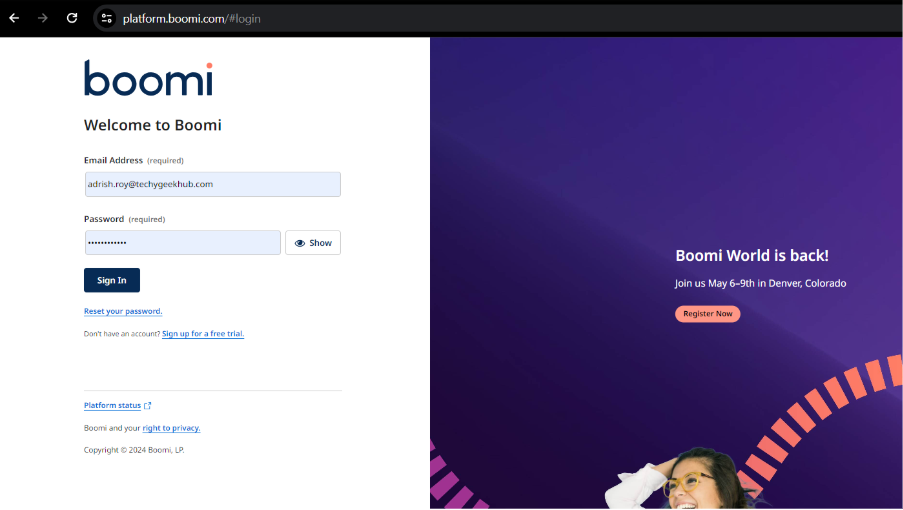
STEP 1: Login to Boomi Platform
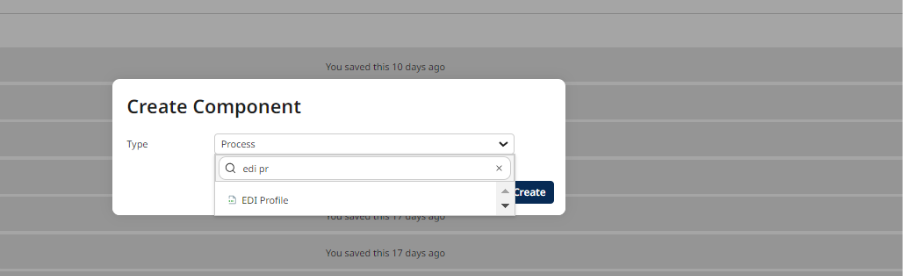
STEP 2: Click on the (+) sign to create a new component

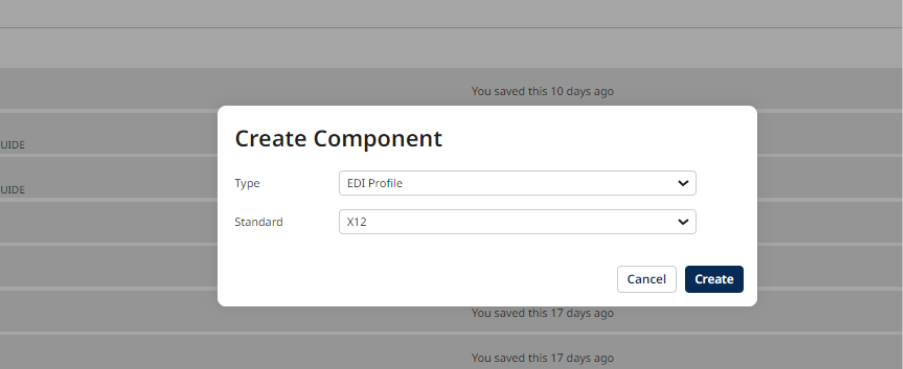
STEP 3: Select the type of component as ‘EDI Profile’
STEP 4: Select the Standard as X12 and click on create
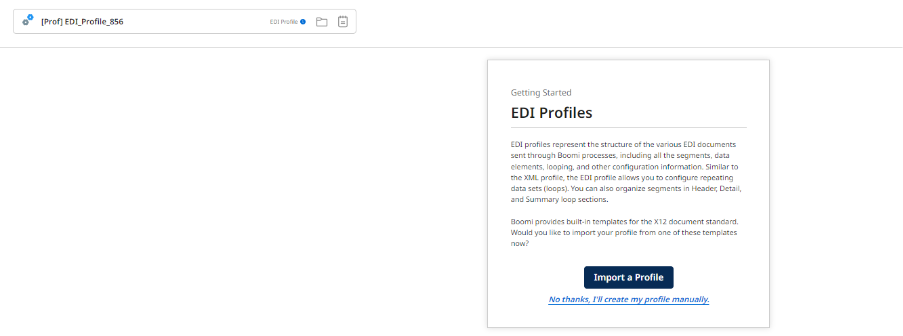
STEP 5: Give proper naming convention as per industry standards and select ‘Import a Profile’
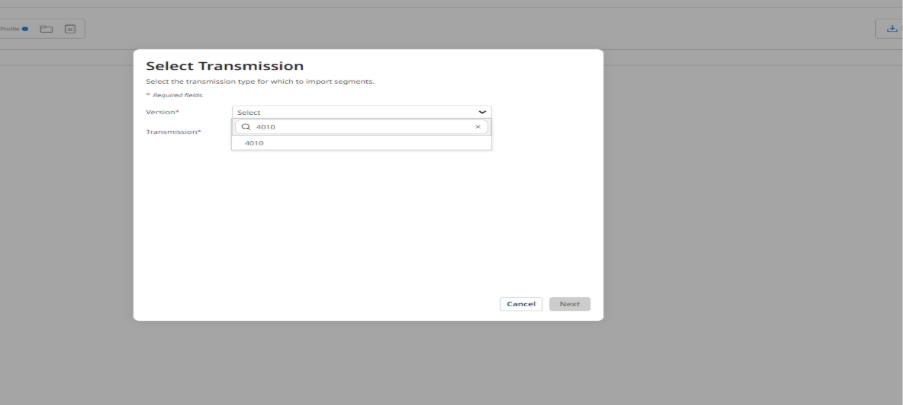
STEP 6: Select the version . In this blog we are using Version 4010
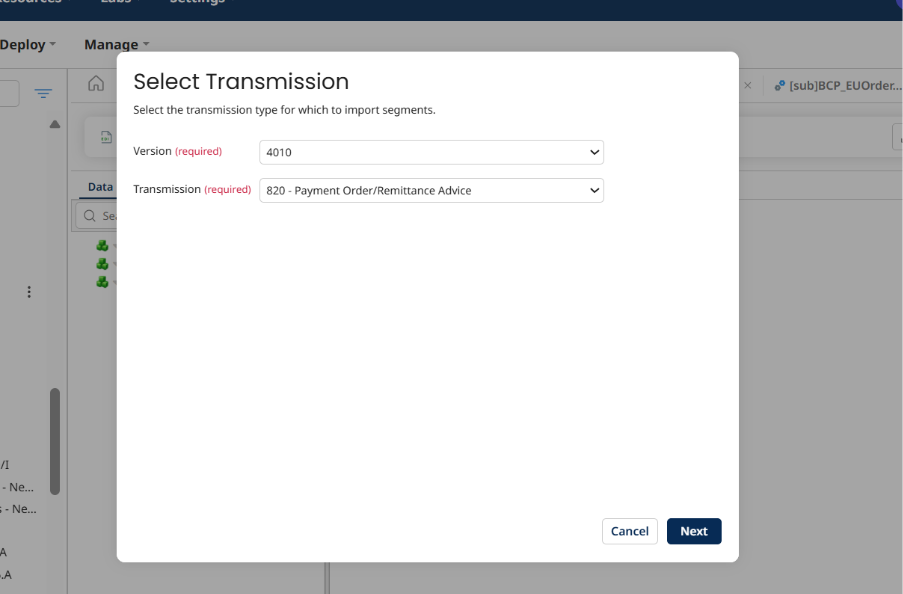
STEP 7: We will select the Transmission 820 and select Next
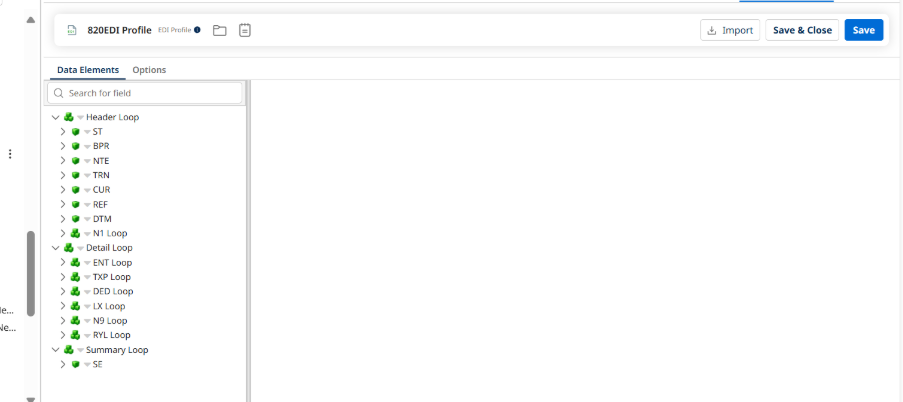
STEP 8: Select the segments . It is preferred to select all the segments . You can also choose specific segments. Click on Import.
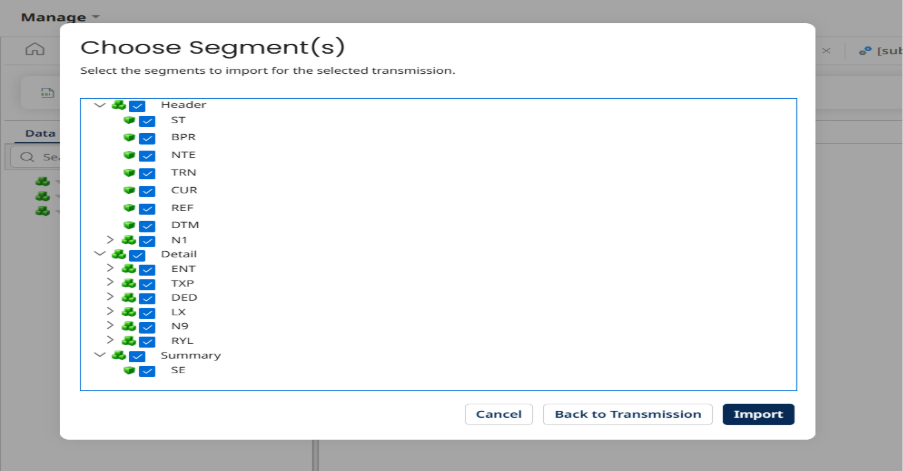
STEP 9: Click on ‘Save & Close’.